Software

EOMasters Toolbox

Free & open source · A plugin for ESA SNAP

More possibilities.
Right inside SNAP.

Turn satellite data into useful results with tools for spectral analysis, Sentinel-2 processing and Python development. Keep your everyday resources close at hand, and take repetitive work out of your workflow.

Since version 2.0, the Basic and Pro editions are one EOMasters Toolbox. All former Pro features are free for everyone.

Read the story behind the unified Toolbox

Explore the detail

Get more from Sentinel-2.

Enhance spatial detail, work with meaningful viewing geometry, and make surface reflectance easier to compare.

10 m / 20 m → 5 m

See super-resolution in action

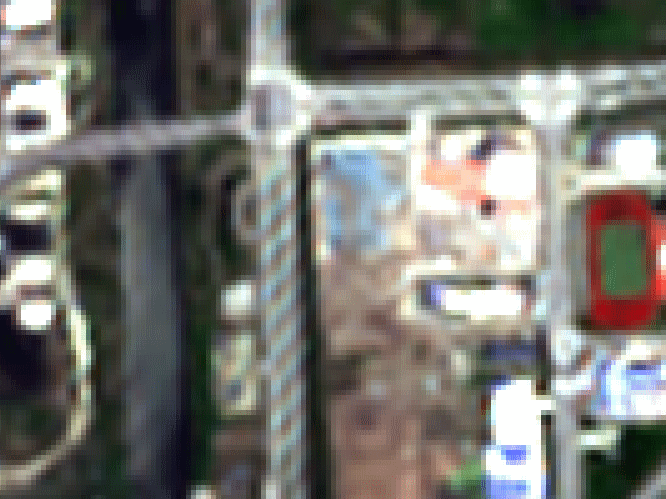
Use the EVOLAND super-resolution model to produce 5 m imagery from Sentinel-2’s 10 m and 20 m bands. Trained with paired Sentinel-2 and VENµS observations, the model predicts finer spatial detail from the input’s spectral and spatial patterns.

The operator can also include geometry and other bands in the output. Optional 60 m bands use bicubic resampling. Compatible NVIDIA CUDA setups can accelerate model processing.

The 5 m detail is model-derived, rather than a new satellite measurement. L2A surface reflectance matches the model’s training domain.

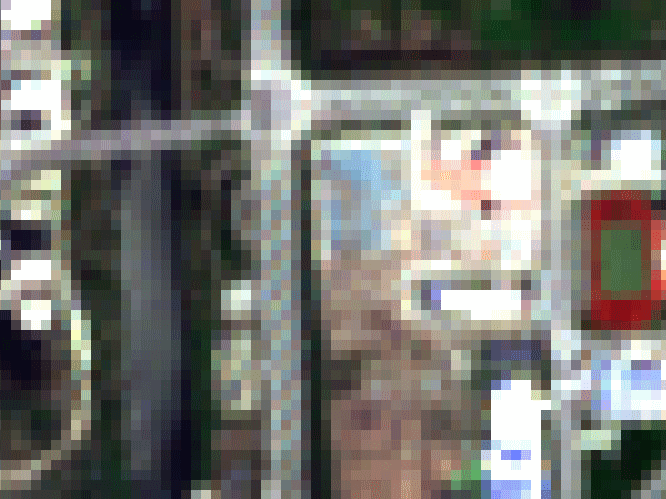
Original Sentinel-2 image at 10-metre resolutionThe same Sentinel-2 scene super-resolved to 5 metres
Drag the divider or use the arrow keys to compare 10 m and 5 m imagery.

Geometry that follows the detectors

Sentinel-2’s sun and view angles start on a coarse grid. Geometry Up-scaling creates angle bands at the spectral bands’ resolutions, taking each detector’s footprint into account when interpolating viewing angles. Use them in atmospheric correction or reflectance normalisation without first putting every band on the same grid.
More comparable surface reflectance

Surface Reflectance Normalisation uses the c-factor method to generate Nadir BRDF Adjusted Reflectance (NBAR). It accounts for observation geometry to reduce viewing-angle effects in comparisons between Sentinel-2 scenes, using the Toolbox’s detector-aware angle calculations.

From bands to information

Choose your indices. Keep your resources.

Spend less time rebuilding formulas and finding the same study areas, and more time exploring your data.

270+ spectral indices

SpeX: a library of spectral insight

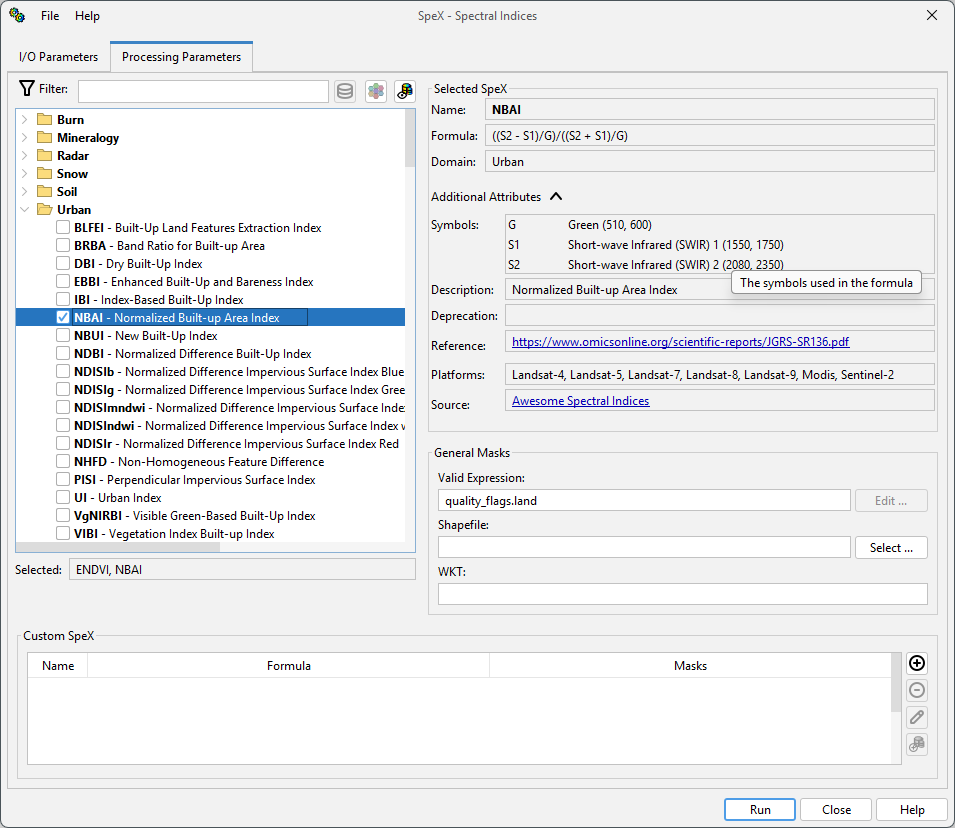
Explore indices for vegetation, water, soil, snow, fire and other applications. Search the database, filter for indices compatible with your product, and compute several in one processing run.

Define custom formulas and apply masks using expressions, WKT geometries or shapefiles. Keep useful definitions in the database, then run them from SNAP’s interface or the command line.

Explore SpeX
SpeX processor showing index selection, formula details and masks
Select indices, inspect formulas and define processing masks.
Save once. Use again.

Asset Library: your working collection

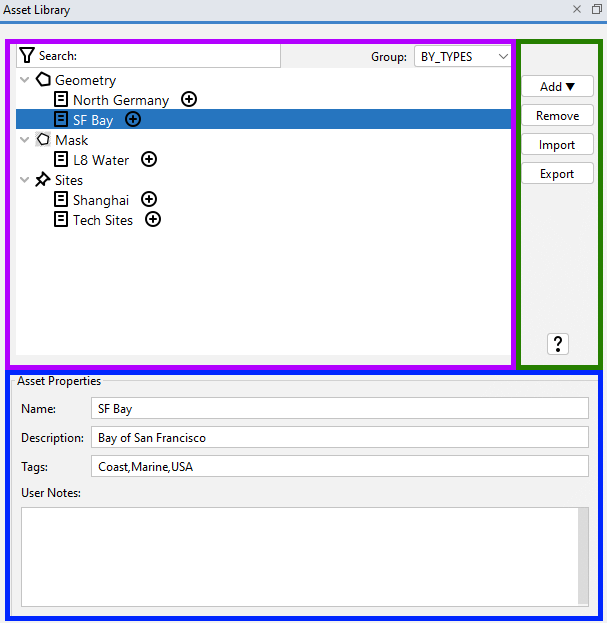
Keep frequently used sites, geometries and masks together in SNAP. Add names, descriptions, tags and notes so you can find the right resource when you need it.

Group and search your collection, then add an asset to an open product. Export and import the library to share resources with colleagues or carry them into another project.

Explore the Asset Library
Asset Library grouping geometries, masks and sites with editable tags and notes
Your locations, regions and masks, ready for the next product.

Prototype. Process. Repeat.

Bring Python into your SNAP workflow.

PyEditor & SnapKit

Write and run Python directly in SNAP with an integrated editor, project management and a console. On first use, PyEditor guides you through setting up its GraalPy runtime.

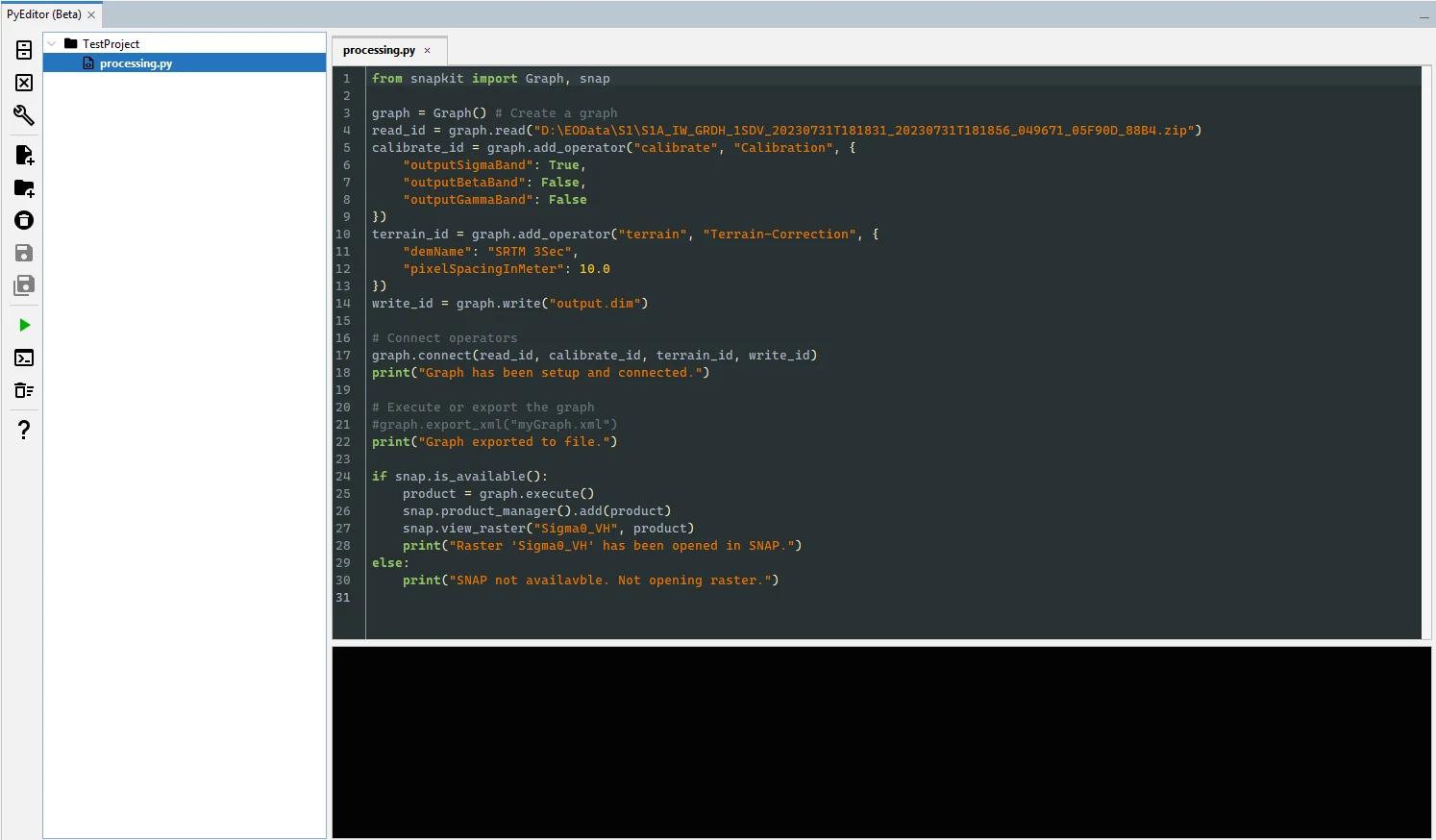
SnapKit provides a Python interface to common SNAP tasks: read and write products, build processing graphs, calculate raster data, and interact with products and views in SNAP.

When your script is ready, PyRunner lets you execute the project from the command line without the desktop interface.

PyEditor inside SNAP with a Python graph for Sentinel-1 calibration and terrain correction
Build a processing graph and work with its output inside SNAP.
Python package support and beta status

PyEditor and the SnapKit API are marked as beta in the SNAP 14 help. That version supports native packages such as NumPy, SciPy and Matplotlib on Linux, with limited package support on Windows. See the setup notes before choosing packages for your project.

Where land meets water

Tools for coastal and aquatic analysis.

Add environmental context to a scene and derive information for water-focused workflows.

Coastal Map

Add land–water, coastline, intertidal and land/water-vicinity indicators to your products. The global map provides 10 m coastal information; the Toolbox adds a flag band and masks for display and further processing.

Cyanobacteria Index

Explore potential cyanobacteria blooms using the spectral shape of reflectance around 680 nm. The processor requires bands in three specified wavelength ranges, helping you check whether your sensor is suitable before processing.

Index & band requirements

A 620 nm band over water

Estimate a band near 620 nm from Sentinel-2’s 665 nm reflectance for water-quality workflows. Add it to an open product or use the operator in a graph. The polynomial model is intended for water observations within its documented input range.

620 nm estimation guide

Small tools. Less repetition.

Make the everyday work easier.

Quick Menu

Bring your most-used SNAP actions into one menu, ordered by how often you use them. Configure the number of entries and reach familiar tools with fewer trips through the menu tree.

Quick Menu guide

Extended Band Maths

Check pixel validity, use map coordinates, and calculate across bands or neighbourhoods. Window functions add local sums, minima, maxima, means and medians to your expressions.

wnd(B8A, 3, "mean")
See the available functions

Wavelength Editor

Edit wavelengths, bandwidths and spectral band indices in one table. Apply the changes to compatible products together, with clipboard support for moving values to and from a spreadsheet.

Wavelength Editor guide

Also included: close products without an open view, copy a coordinate reference system as WKT, list supported input/output formats, and create a system report for troubleshooting. See all tools in the help overview

Open more data

Additional readers for SNAP.

ASTER L1T

Read terrain-corrected ASTER L1T products, including available VNIR, SWIR and thermal infrared bands. Digital numbers are scaled to radiance values.

ASTER reader guide

EMIT L1B & L2A

Open EMIT radiance and reflectance products. Include the matching observation, mask or uncertainty files when they are present alongside the primary data file.

EMIT reader guide

Sentinel-2 B1 footprints

Resolve the mismatch between the L2A B1 band and its detector-footprint mask. Choose a reader that scales the footprint to 20 m or uses B1 at its native 60 m resolution.

Choose the appropriate reader

Get started

One Toolbox.
Free for everyone.

EOMasters Toolbox is an open-source plugin for ESA SNAP. Install it through SNAP’s Plugin Manager and explore the features in your own projects.

Get ESA SNAP
  1. Open the Plugin Manager

    Start SNAP and open its Plugin Manager.

  2. Select EOMasters Toolbox

    Find the Toolbox among the available plugins and follow the installation prompts.

  3. Pick a workflow

    Start with a familiar scene and use the user guide for feature-specific inputs, options and examples.

Explore the code, report a problem or suggest the next useful feature.